What's New in MatrixGold 4.1
Expands what’s possible in jewelry design with smarter modeling workflows, Advanced Pavé, four mesh tools, experimental AI assistance, and much more.

MatrixGold 4.1.26313.2001 Release Notes.
New Features
Array Transform
- Added a dynamic version of Rhino’s Array command.
Custom Ribbon Toolbar Items
- Users can upload their own custom icons.
- Users can assign custom scripts for both left-click and right-click functionality.
- Users can define custom names and tooltips for toolbar items.
- Custom items are compatible with the Quick Commands and Recent Commands panels.
Rhino MCP
- Users can now connect MatrixGold with local AI assistants.
- This connection allows AI assistants to interact with and read the Rhino document.
Pavé
- New Pavé tool featuring an advanced algorithm designed for freeform, non-symmetrical shapes.
- Supports multiple stone sizes.
- Includes productivity shortcuts.
- Allows instant recalculation of layouts until the desired result is achieved.
- Stones can be locked in place, enabling recalculation of surrounding areas while preserving critical design elements.
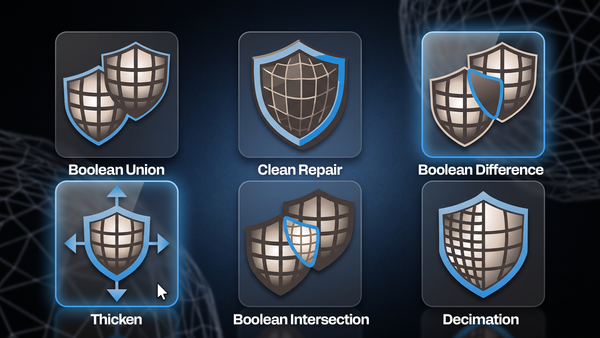
Mesh Tools
-
GvMeshCleanRepair
- Identifies and repairs common mesh issues with significantly improved results compared to the existing Mesh Repair tool.
-
GvMeshThicken
- Adds thickness to mesh geometry.
-
GvMeshDecimation
- Reduces mesh complexity while preserving the overall form.
-
GVMeshBooleanUnion
- Combines multiple mesh objects into a single mesh result.
-
GvMeshBooleanIntersection
- Creates a mesh from the shared volume between mesh objects.
-
GvMeshBooleanDifference
- Subtracts one mesh object from another.
gvShow
- Users can now show all gvHidden objects with a single command.
SubD Category
- Added a new Ribbon Toolbar category for SubD tools.
AngleCurve Command
- New tool for creating curves with points repeated in sections and arrayed around a common center point.
AxisRotatedCurve Command
- Similar to the AngleCurve command.
- Mirrors newly created points over an axis in the middle of each section.
Append Inputs
- Users can append objects to the current builder selection without having to reselect previously input objects.
Viewport Widget
- Added new options for the directional indicator object displayed in the top-right corner of the viewport:
- Astronaut
- Bust
- Chair
- Fighter Plane
- Human
- Earring
- Pendant
Enhancements
- Tech Report can now be opened directly from the command line.
- Added additional round gem sizes to the Gem Table, including 2.3 mm and 2.6 mm.
- Added support for custom round stone sizes.
- Added a vertical separator between the Search Bar and Ribbon Categories, providing a dedicated space for dragging the MatrixGold window.
- Added User Ribbon commands to the Misc tab.
- Users can now delete points in Curve On Object by Shift + Left Click while the command is active.
- Added new textures to Texture3D.
- Improved Texture3D and Content Manager loading speed.
- Added a calendar date picker control to Tech Report.
- Users can now select a default render mode in Tech Report.
- Added an AutoGroup toggle:
- When disabled, MatrixGold commands will not group outputs.
- Improved Smart Curve with new UI elements matching those introduced in AngleCurve and AxisRotatedCurve.
- AngleCurve and AxisRotatedCurve now support non-XY CPlanes.
- Advanced Pavé received improved border-distance controls along with multiple UI and workflow refinements.
- Improved object selection and management workflows within MatrixGold commands.
- Append Inputs now supports selecting subobjects when appending geometry.
- Updated the Append Selection indicator icon to display in white.
- Optimized visualization meshing parameters to improve display performance.
- Updated the French localization for "Settings".
- Improved Halo object positioning.
- gvShow now reveals hidden objects and hidden layers.
Bug Fixes
- Fixed an issue where deleting objects could cause program slowdown.
- Fixed an issue where render meshes were saved into plugin data, causing unnecessarily large file sizes.
- Fixed an issue where the viewport would jump after moving a control point on a curve.
- Fixed an issue where the program could hang when dragging symmetry points in the Profile Editor while Gumball controls were enabled.
- Fixed an issue where canceling an edit to Gem Cutter in the first category could cause document desynchronization.
- Fixed an issue where specific side profile configurations in Signet Advanced could make the builder unrecoverable.
- Fixed an issue where rapidly performing multiple actions in the Recent Commands panel could cause the panel to stop responding.
- Fixed formatting issues in the gvMetalWeights window.
- Fixed an issue where Rhino's ambiguous selection prompt appeared in situations where it should not.
- Fixed an issue where Award Ring Builder could flip surfaces when using certain surface profiles.
- Fixed focus-loss behavior in various UI elements.